


Driver Power App
2.910.00 Reviews
App Specs
- Version
- 2.2.0
- Updated On
- License
- Free
- Downloads
- 10,000+
- Developer
- Byteblocks, LLC
- Categories
- Business
- Platform
- Android
Screenshots
 Analysis by AppCompare
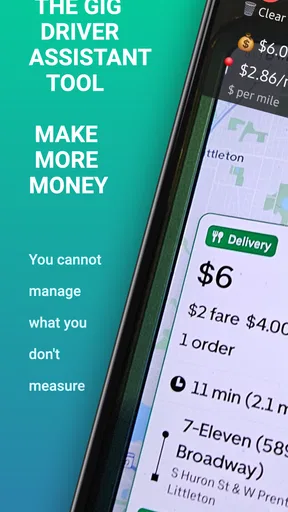
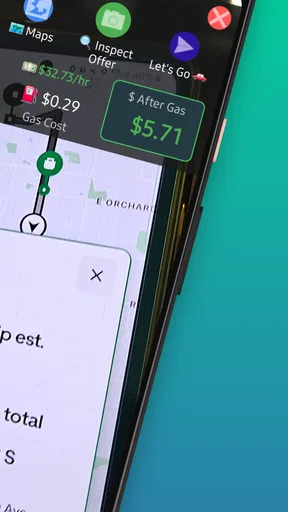
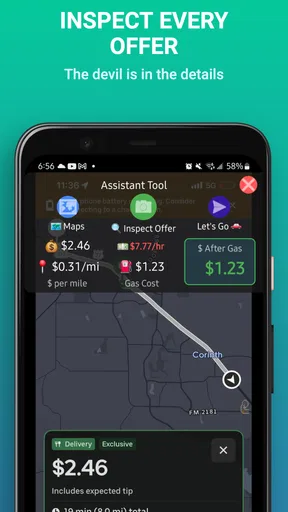
I tried Driver Power App as a practical business tool for checking whether a rideshare or delivery job is worth taking. The idea is straightforward: instead of accepting an offer based only on the amount shown, I can use a separate calculator to think through the trip, distance, and likely return. That makes it potentially useful for drivers who want a quick second opinion before committing their time, fuel, and vehicle wear.
My first impression is that this is a focused utility rather than a complete driver-management platform. It does not try to replace the rideshare or delivery service where work is offered. Its value is in the decision between “take it” and “leave it.” That narrow purpose can be helpful, especially when several jobs look similar but have very different practical value once travel time and expenses are considered.
The most useful way to think about Driver Power App is as a private calculation layer between the work app and my own judgment. It can help turn a vague feeling that an order is poor into a clearer estimate. At the same time, I would not treat its result as an automatic answer. A calculator can organize the numbers, but it cannot know every traffic delay, difficult pickup, parking problem, or personal reason a driver may have for choosing one trip over another.
How it fits into a shared household or shared device
A realistic use case is a household where two people share one phone or tablet for occasional delivery work, or where one person uses the device while another helps compare offers. In that setting, the app can be useful because the calculation itself creates a common point of discussion. One person can read the offer details, while the other checks whether the trip still makes sense after considering the broader route.
I found this kind of shared use more valuable than simply showing someone the payout. A household may be deciding whether a short job is worthwhile before dinner, whether a longer trip will take the driver too far from home, or whether an apparently attractive offer will leave an unpaid return journey. Driver Power App gives the conversation a practical structure instead of relying entirely on instinct.
There is an important boundary, though. A shared device is not the same thing as shared accounts. I would avoid assuming that the app separates different drivers automatically or remembers whose figures belong to whom. If two people use it, they should agree on a simple routine: identify the driver, enter the current assumptions, review the result, and clear or replace the values before the next person uses the calculator.
That small habit matters because fuel costs, preferred minimum earnings, vehicle type, and driving patterns can differ. A calculation that looks sensible for one person may be misleading for another. If my partner and I use the same device, I would keep personal notes outside the app or use a clearly agreed set of assumptions rather than treating one person’s settings as a household standard.
Worth Reading Before You Choose

EA SPORTS FC Mobile 26 Is a Bigger Football Game, but It Takes Time

Flipboard Shows What News Apps Must Do Beyond the Feed

Switching to Android Auto Means Rethinking Your Driving Routine

Google Calendar Makes a Crowded Week Easier to Manage

Ludo King Makes the Most of the Minutes Between Plans

Baby Panda World Brings Quick Play to Modern Phones, but Its Game Library Feels Busy
For families, another practical point is that the app is aimed at work decisions, not general household budgeting. I would not use it as a shared expense ledger or as a replacement for tracking actual fuel purchases. It can support a quick decision about a ride or delivery, but the household still needs a separate method for reviewing real income and costs over time.
What I would prepare before handing over the phone
Before using it in a shared setting, I would decide which information is safe and useful to enter while another person is nearby. The calculator should be used for the job’s practical numbers, not for sharing unnecessary personal details. If a driver receives an offer through another service, I would manually transfer only the information needed for the estimate and keep customer names, addresses, and other private details out of the process.
I would also agree on who makes the final decision. A helper can calculate, but the driver remains responsible for accepting work and judging the road conditions. This is especially important when someone is looking at the screen from the passenger seat. The app may help with planning, but it should never encourage a driver to type, read, or compare figures while moving.
Setup boundaries and the first working routine
Driver Power App is free to install, which makes it easy to test without committing money at the start. It is listed for Everyone, and it runs on Android devices using version 8.0 or later. Those details make it accessible for many older phones, although the age label should not be confused with a recommendation for children to use it independently. The real context is commercial driving and adult responsibility.
The current release is version 2.2.0, and the developer is Byteblocks, LLC. The app has passed the basic discovery stage with over ten thousand installs, but its average rating is 2.9 from around thirty ratings. I would interpret that as a reason to test it carefully with my own workflow rather than assuming it will suit every driver immediately.
My setup advice is to start with one familiar trip instead of trying to build a complete driving system around it. I would compare a normal offer with my own rough calculation, then check whether the result feels sensible. This first test is useful because it shows whether the app’s way of presenting the estimate matches how I personally think about time, distance, and operating cost.
The key boundary is that a calculator is only as accurate as the assumptions I give it. If I forget the unpaid distance to the pickup, ignore a likely return journey, or use an unrealistic fuel estimate, the result may look precise while still being wrong for my situation. I would therefore treat every figure as an estimate and keep a small margin for uncertainty.
One of the less obvious benefits is that it can force me to notice costs that are easy to ignore during a busy shift. A driver may focus on the payment shown by the work platform and forget that a trip can consume time without producing another paid mile. Entering the offer into a separate tool creates a pause, and that pause can prevent impulsive decisions.
The trade-off is speed. A driver who wants instant acceptance with no extra thought may find a separate calculator inconvenient. In a high-demand period, spending even a little longer on each offer could mean missing the next one. I would use it selectively for borderline jobs, unfamiliar areas, long-distance requests, or deliveries with a difficult return rather than for every routine trip.
Keeping the calculation useful instead of overly optimistic
I would build a personal checklist around the app. First, I would consider the total time, not just the estimated driving portion. Waiting, finding a pickup location, loading, parking, and walking to a delivery door can change the result. Second, I would consider where the trip ends. A job that pays reasonably may still be weak if it leaves me far from the area where I normally find work.
Third, I would separate immediate cash from true earnings. Fuel is visible, but maintenance, depreciation, insurance, and taxes also affect the value of driving. Driver Power App may help organize the decision, but I would not expect it to replace a full financial record. For a monthly review, a spreadsheet or dedicated bookkeeping tool is likely better.
This is also where the app compares differently with the usual alternatives. A mental estimate is faster but inconsistent. A notes app is flexible but requires me to build the formulas and remember them. A spreadsheet can be more detailed and personalized, but it is slower to use from a phone during a shift. Driver Power App sits between those options: more structured than a note, less comprehensive than bookkeeping, and potentially faster than maintaining a custom spreadsheet.
Coordination between the work app and the calculator
The strongest workflow I found is to keep Driver Power App beside the service that offers the ride or delivery, using the calculator only when an offer needs closer inspection. I would read the offer first, estimate the full route, and then enter the relevant figures. After that, I would compare the result with practical conditions such as traffic, parking, weather, and the likelihood of finding another job nearby.
This separation has a useful psychological effect. The platform offering the work naturally emphasizes the payout and the opportunity to accept. A separate calculator encourages a more deliberate decision. I can ask, “What will this actually require from me?” rather than reacting only to the headline amount.
For a shared household, coordination can happen before the shift as well. One person might help define a reasonable minimum for a particular vehicle, while the driver decides whether that rule fits the current area. If the household is trying to cover a specific expense, the calculator can support a conversation about which jobs are worth the time, but it should not become a pressure tool that forces someone to accept unsafe or unsuitable work.
A practical tip is to review the route as a whole rather than calculating only the paid segment. Suppose I am near home and receive a delivery that ends in a distant area. The offer may look acceptable when viewed alone, but the return to my normal zone changes the decision. I would include that likely repositioning in my mental review, even if the app itself is not aware of my next destination.
Another useful trade-off involves consistency versus flexibility. Using the same assumptions every time makes offers easier to compare, but real conditions change. Fuel prices, traffic, weather, and the time of day can alter the value of a trip. I would keep a standard baseline for ordinary decisions and then add a caution when conditions are unusually difficult.
I would also avoid entering information while driving. The app belongs in the planning stage, while parked or before leaving. If an offer arrives unexpectedly, safety comes first; I can decline to calculate it immediately or wait until I am stopped. No potential improvement in earnings justifies handling a phone in moving traffic.
Age, trust, and responsibility in everyday use
The Everyone content rating describes the app’s general content, not the maturity needed to use it responsibly. Because Driver Power App supports decisions connected with rideshare and delivery work, I would regard it as an adult-oriented practical tool even though its store classification is broad. A younger household member could perhaps help with arithmetic while supervised, but I would not hand over driving decisions or account access to a child.
Trust also matters when several people share the device. The calculator may contain assumptions that reveal how a driver evaluates work, but it is not a substitute for clear account boundaries. I would keep each person’s work-service login private and avoid letting a helper accept jobs, change settings, or make decisions on the driver’s behalf unless that arrangement is genuinely understood and safe.
There is a difference between coordination and surveillance. A household can use the app to discuss whether a trip is worthwhile without turning every calculation into a judgment about the driver’s performance. Earnings decisions depend on personal comfort, local knowledge, and fatigue. If someone has already worked a long shift, the best decision may be to stop even when a calculation looks attractive.
The same principle applies to passengers. If I am using the app during a rideshare shift, I would keep the screen and any offer details private. A passenger does not need to see another customer’s information or the driver’s personal financial assumptions. The calculator’s usefulness should not come at the expense of privacy or professional conduct.
For a household trying to teach financial habits, the app can be a useful conversation starter because it connects a job offer with real-world costs. I would use it to explain why revenue is not the same as profit and why time has value. However, I would pair it with actual records so that the lesson is based on completed work rather than estimates alone.
Who should use it and who should choose something else
I think Driver Power App is best suited to independent drivers who regularly question whether a ride or delivery is worth accepting. It is also a reasonable trial for someone who currently relies on rough mental math and wants a more repeatable process without immediately building a spreadsheet.
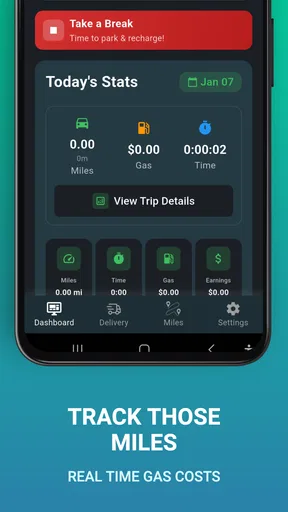
It is less suitable for a driver who needs automatic mileage tracking, tax reports, detailed income history, navigation, scheduling, or fleet management. Those needs call for a broader driver-management or bookkeeping solution. The app’s focused role is its advantage for quick comparisons, but that same focus limits it as an all-in-one business system.
I would also hesitate to recommend it as the main tool for a professional operation with several drivers and strict reporting requirements. A shared calculator can support discussion, but a business with multiple vehicles usually needs clear records, user separation, permissions, and historical reporting. I would not assume those functions from a rideshare and delivery calculator alone.
The in-app purchase range runs from a few cents to just under forty-eight dollars per item. Since the app can be tried for free, I would begin with the basic experience and only consider a purchase if I clearly understand what extra value it provides for my routine. I would not pay simply because a calculation feels useful; I would first compare it with the cost and flexibility of a spreadsheet or another established tool.
My household verdict after using it as a decision aid
Driver Power App makes sense when the problem is not finding work but judging the work already offered. I like the idea of separating the offer from the decision, especially for jobs where unpaid travel, waiting, or a difficult destination can quietly reduce the real return. Used carefully, it can give a driver a calmer and more consistent way to think before accepting.
Its best household role is modest and practical. One person can help another check a borderline trip, compare assumptions, or discuss whether a shift is meeting its purpose. The device should remain a tool for coordination, not a shared account hub, financial ledger, or substitute for personal judgment.
The average rating of 2.9 and the relatively small review base make me cautious rather than dismissive. I would install it, test it against several familiar offers, and decide whether its flow is quick enough for my driving style. If I need detailed records or automatic tracking, I would move to a more complete alternative instead of forcing this app to do a job it was not designed to handle.
My final recommendation is therefore conditional but positive: try it if you want a dedicated second opinion for rideshare and delivery decisions, particularly when you are currently relying on mental arithmetic. Keep your assumptions realistic, include the hidden parts of a trip, and use it only while safely parked or planning ahead. For a household, the winning approach is simple boundaries, private work accounts, and an agreement that the driver—not the calculator or the helper—makes the final call.
Driver Power App is most valuable when it helps me slow down just enough to recognize a bad offer. It will not turn every trip into a profitable one, and it should not replace proper business records, but it can make everyday decisions more deliberate. For the right driver, that small improvement in judgment may be more useful than a long list of extra features.
Pros
- Tracks driving habits and trip data in an easy-to-read dashboard.
- Can help identify harsh braking
- speeding
- and inefficient driving patterns.
- Useful for monitoring mileage and keeping a record of regular journeys.
- May encourage safer
- smoother driving through performance feedback.
- Simple setup makes it accessible for everyday drivers.
Cons
- Tracking accuracy can vary depending on phone sensors and GPS reception.
- Continuous location monitoring may increase battery consumption.
- Some features may require permissions that raise privacy concerns.
- Data insights can be limited without enough completed trips.
- Driver feedback may feel basic compared with dedicated telematics devices.
FAQs for Driver Power App
What is the Driver Power app used for?
Driver Power is designed to help drivers manage and review vehicle-related information and services from a mobile device. Depending on the version and region, it may provide access to driver resources, vehicle data, service tools, notifications, or account features. Before downloading, check the official store description because available functions can differ by country, vehicle brand, subscription, or connected hardware.
Is Driver Power compatible with my Android or iPhone?
Compatibility depends on your phone’s operating system, its software version, and sometimes the vehicle or device connected to the app. From my review, users should check the Google Play Store or Apple App Store listing before installing, since minimum requirements can change after updates. Some features may also require Bluetooth, location access, mobile data, or a supported vehicle system.
Does Driver Power require an account or subscription?
Driver Power may require users to create an account or sign in before accessing personalized functions, stored vehicle information, or connected services. Certain features can also depend on a paid plan, a participating provider, or compatible equipment. Review the app’s current terms, in-app pricing, and privacy information before committing, especially if you only want to use its basic tools.
What permissions does Driver Power request, and are they necessary?
Like many driving and connected-vehicle applications, Driver Power may request permissions such as location, Bluetooth, notifications, camera access, storage, or mobile data. These permissions can support pairing, navigation-related functions, alerts, document uploads, or communication with vehicle hardware. You can review and change permissions in your phone settings, although disabling some may prevent related features from working correctly.
Is Driver Power safe and reliable to use while driving?
Driver Power should be configured before starting a journey and used only when the vehicle is safely parked. Even if the app offers useful alerts or driving-related information, interacting with a phone while driving can be distracting and unsafe. Keep the application updated, download it only from an official store, protect your login details, and verify important vehicle or service information independently when necessary.


